How to Get Real Value from AI in Site Selection
Every expansion team is working out how to use AI in site selection. What work should it take on, which answers can you trust, and how do you turn one good result into something the whole team can repeat? We’ve spent a lot of time on those questions ourselves, especially around headless site selection: running your site selection work from inside the AI assistant your company already uses, instead of through the platform’s own screens. So we built a webinar around it.
On November 17, we held a webinar focusing on the future of MCP-based Site Selection and took questions from franchise and multi-unit leaders.
Here’s what we found, in four takeaways you can apply whichever AI assistant your company uses.
Start with the AI Your Company Already Approved
The AI decision usually happens above the real estate team. IT, legal or leadership picks an assistant and sets the rules for company data, and every other tool is expected to fit inside those lines. Most of our attendees are already there: 59% said their organization has a standardized AI tool policy, and two thirds use Claude at work. A week earlier, our team heard a similar range at the Restaurant Finance and Development Conference, from operators just starting to experiment to companies running AI across the business.
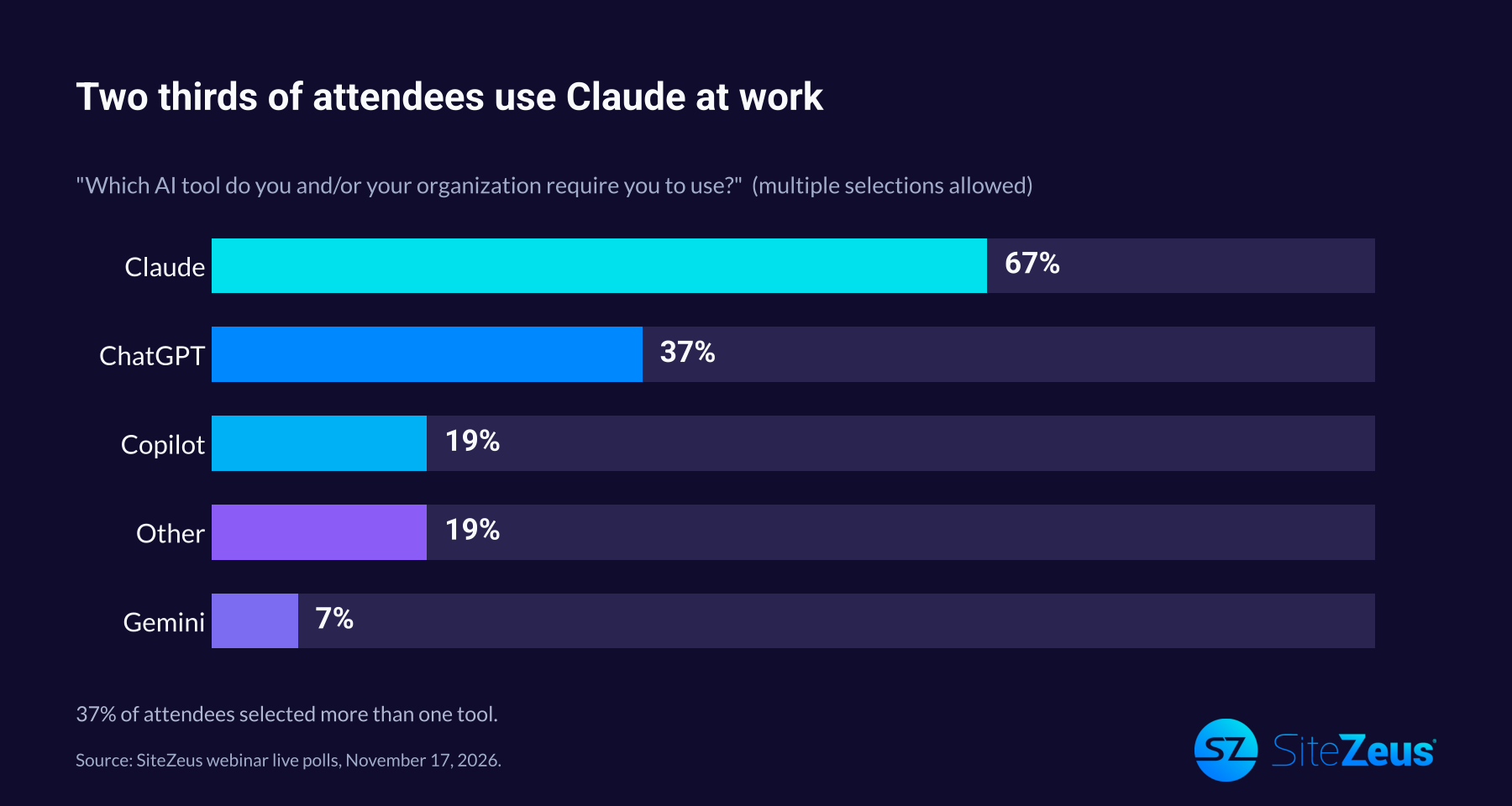
AI tools webinar attendees use at work. Multiple selections allowed.
The direction is consistent. Companies don’t want 30 software subscriptions, each with its own AI agent and data rules. They want one AI platform with everything else connected to it, usually through Model Context Protocol (MCP), the standard way AI assistants connect to other software.
That changes how you should evaluate site selection software. Before asking what a vendor’s AI can do, ask whether the platform works inside the assistant you’re approved to use, whether that connection can write back or only read, and whether it costs extra. Many connections in location intelligence are read-only, so your assistant can pull data out but you still go back into the software to finish the job. The SiteZeus connector used in the demo includes 45 read-only tools and 28 that write or delete, and it comes with your existing subscription. If your company doesn’t have a policy yet, plan for one, and make sure your site selection data can follow you to whichever assistant gets approved.
Hand AI Whole Workflows, Not Single Questions
Most site selection work isn’t one question. A real estate committee package pulls a forecast, a scorecard, comparable stores, co-tenancy, broker materials and lease terms into a branded template. Matching franchise prospects to territories means working across a CRM and a location platform that rarely talk to each other.
Multi-step, multi-system jobs like these are where connecting AI to your site selection platform pays off. In the demo, working as a fictional brand called Zeus’ Sandwich Shop, we ran a full expansion workflow in seven prompts inside a standard Claude chat:
- Built a lunch-rush scorecard from 299 existing stores and saved it to the brand’s project.
- Ran a white space analysis around big-box anchors in five states.
- Matched qualified franchise leads from a CRM export to open markets and drafted outreach emails.
- Searched available listings against the brand’s building profile.
- Filled the brand’s blank real estate committee template with the site’s forecast, scorecard, comparable stores, co-tenancy and sales impact.
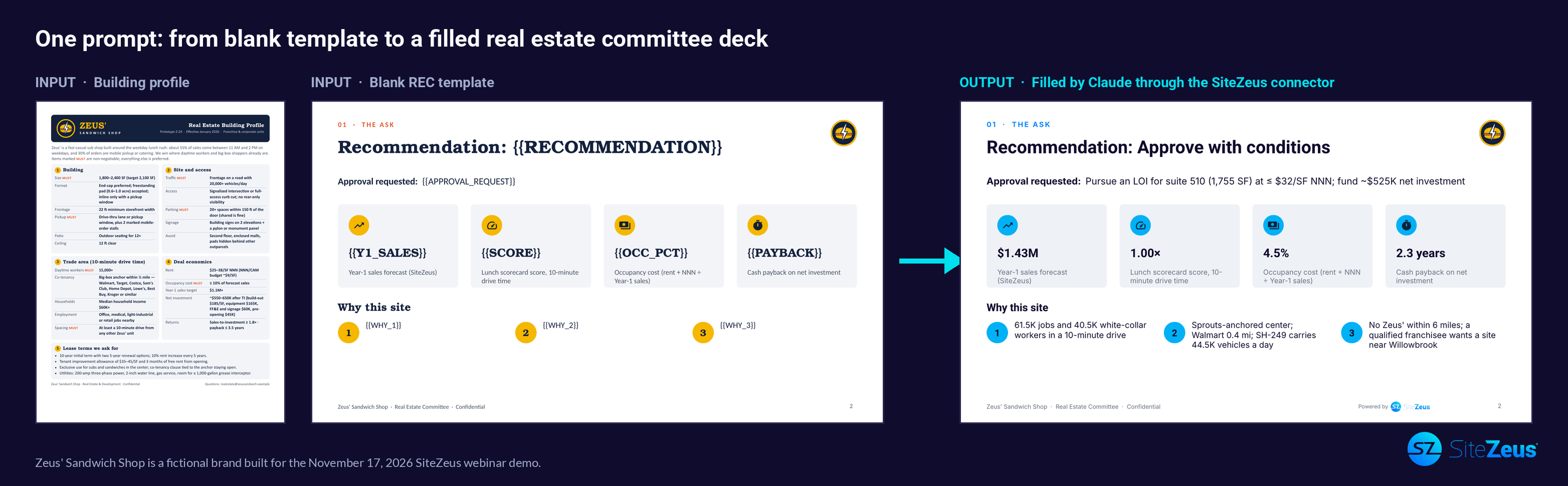
The building profile and blank template that went in, and the committee deck that came out. Zeus’ Sandwich Shop is a fictional demo brand.
The scorecard alone took about a minute and a half. Setting one up used to mean onboarding, model training and working sessions with support to agree on which variables matter.
To find your own starting point, look for work that pulls from more than one system, follows the same steps every time and ends in a deliverable someone reviews. Committee packages, franchise outreach and portfolio reviews all fit. So do the questions you’ve never had time to chase. One attendee asked whether AI could compare models and site revenue across past projects, year over year. It can, across any project in your login, without exporting data into spreadsheets first.
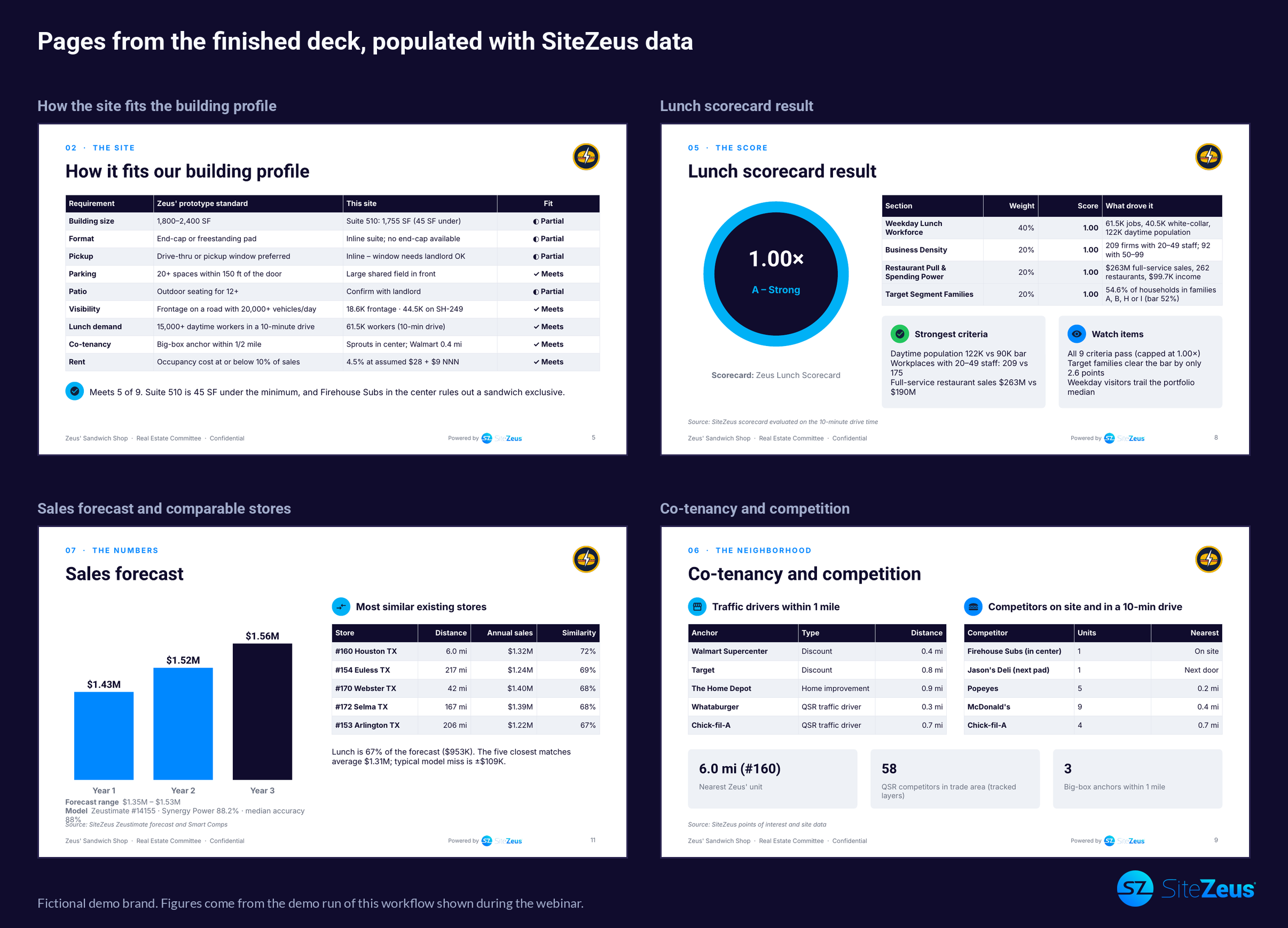
Pages from the finished deck: building profile fit, scorecard, sales forecast and co-tenancy.
Trust the Data, Then Check the Interpretation
Every AI provider warns that its models can make mistakes, and attendees asked the fair follow-up: why trust the output at all? The answer depends on what you’re asking and where the data comes from.
When Is AI Reliable for Site Selection Analysis?
Descriptive questions, like the population within a mile of a site, carry little risk when the AI pulls from your site selection platform. Trouble starts when you stack hypotheticals. Ask a general-purpose AI how a new site will affect a nearby store, mention a road closure, and it will often adjust its answer to agree with you. Connected to SiteZeus, your assistant calls the same sales impact model your team already uses, which returns the same answer however you phrase the question.
A practical rule: trust the underlying data, and judge the AI’s interpretation of it on its own. Use AI to automate and present the work, not to make the call. When something looks off, ask the AI to show its work and walk you through each step. That’s faster than rebuilding the analysis by hand.
Is Your Location Data Secure When You Connect AI?
One attendee asked how to be sure an AI assistant couldn’t open their location data to competitors. Two layers protect it. Your company’s license with its AI provider sets the rules for how the provider handles your data. The connection to SiteZeus uses the same security as the product itself: you sign in with your own credentials, access is tied to you as a user, and the assistant can’t reach your data without your authorization. The exposure is the same as someone getting hold of your login today.
Make Good Results Repeatable, Then Connect More Systems
You don’t need a prompt library or custom setup to start. The demo used plain prompts in a new chat. Your AI account administrator does need to allow the connection, and SiteZeus customers can get setup directions from their support rep.
Once a workflow produces something you’d use again, keep it. Ask your AI to turn the session into a skill it can repeat, then set up a scheduled routine, such as a weekly search for new listings that fit your criteria. We call this bespoke software: the exact report, presentation or routine your team wants, built on top of your site selection platform without waiting on a product roadmap.
From there, the value grows with every system you connect. Add your CRM, project management and finance tools to the same AI, and one conversation can carry a site from white space to franchise outreach to committee approval. Maps and visual analysis still live in SiteZeus Locate, so you can move between the platform and your AI as the work requires.
Want to see the full demo and Q&A? Watch the recording.
Recommended Posts